In 2026, a portable charger (power bank) is no longer just a "battery in a plastic case"—it’s a sophisticated piece of engineering. With the rise of GaN (Gallium Nitride) technology and the widespread adoption of the Qi2 standard, choosing the right one has become both easier and more nuanced.
Below is a professional breakdown of everything you need to know about the current state of the industry.
1. Capacity: Marketing vs. Real-World Use
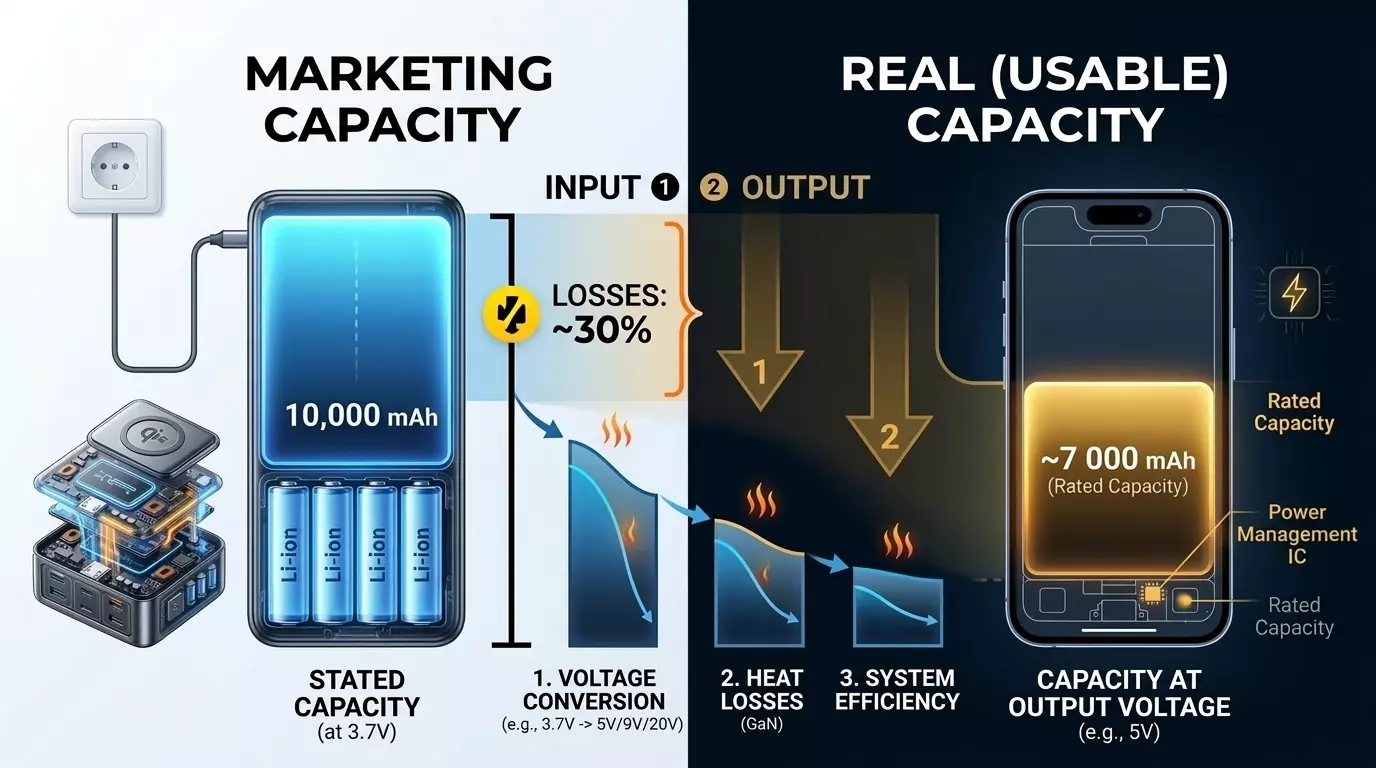
The first thing that trips up beginners is the number printed on the shell. If a power bank says 10,000 mAh, you will never actually get all 10,000 mAh into your smartphone.
- Nominal Capacity: The total capacity of the internal battery cells (usually measured at 3.7V).
- Rated Capacity (Usable Energy): What the battery actually delivers "out the gate" after converting the voltage to 5V, 9V, or 20V.
- Efficiency: You lose about 15–30% of energy during the conversion process and through heat dissipation.
Pro Tip: To figure out how many times a power bank will actually charge your phone, use this formula:
(Capacity x 0.7) / Phone \ Battery \ Capacity = Number \ of \ Charges
For a 10,000 mAh bank and an iPhone 15 (3,349 mAh), the math looks like this: (10,000 x 0.7) / 3,349 = roughly 2 full charge cycles.
2. Speed and Protocols: Why "Fast Charging" Isn’t Always Fast
It's not enough to just buy a powerful power bank; it needs to "shake hands" with your device.
- Power Delivery (PD 3.1): The current gold standard. If you need to charge a laptop, look for PD support ranging from 65W to 140W (for the MacBook Pro).
- PPS (Programmable Power Supply): Absolutely critical for Samsung and Google Pixel owners. Without PPS, your power bank might cap out at 15-18W instead of the promised 45W.
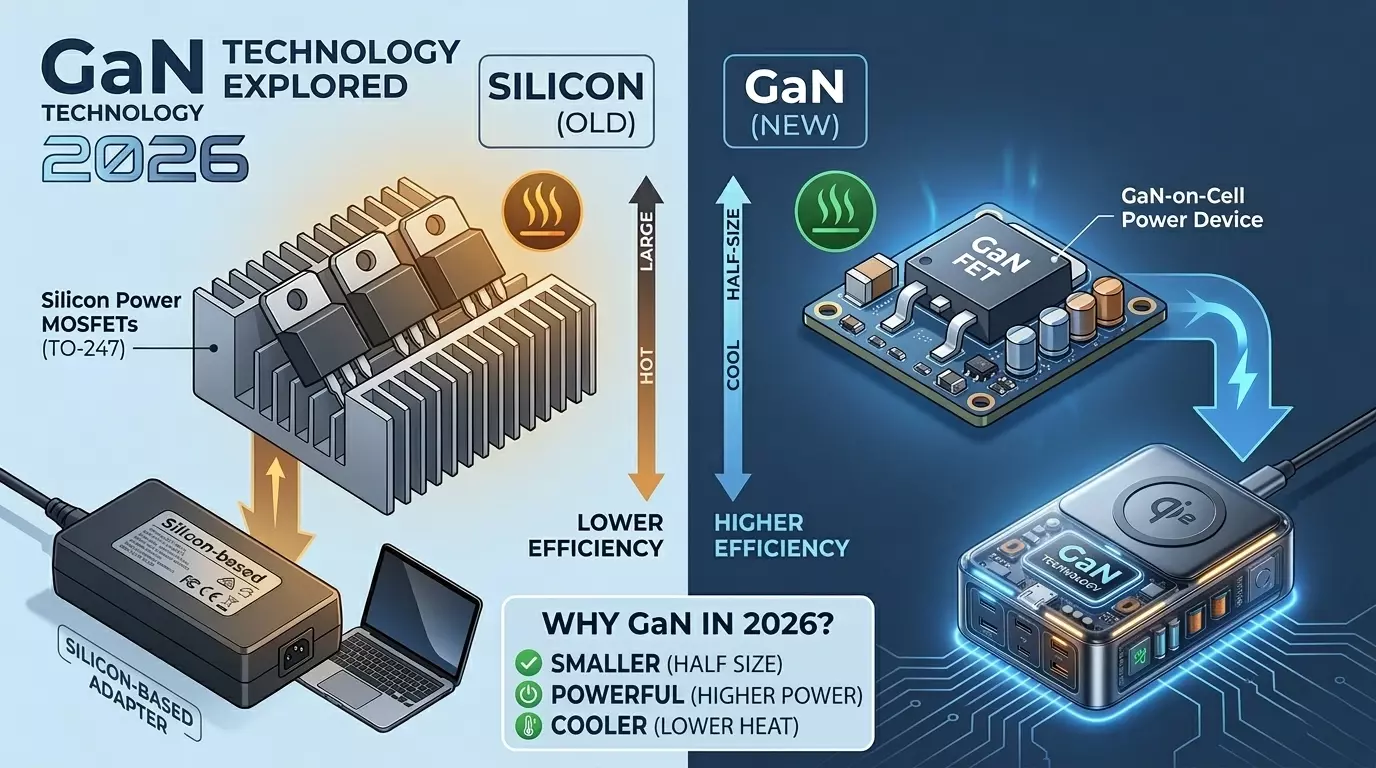
- GaN Technology: By 2026, this is standard for high-end devices. Gallium Nitride transistors run cooler, allowing 100W+ chargers to be as small as a pack of cigarettes.
3. Little-Known Facts and "Hidden" Features
- Pass-through Charging: This allows you to charge the power bank and your connected phone simultaneously from a single outlet. It’s a lifesaver in hotels with limited plugs. Word of caution: cheap models tend to overheat significantly when doing this.
- Trickle Charge Mode: If you plug TWS earbuds or a fitness tracker into a standard power bank, it might shut off after 30 seconds because it thinks there's no load. Professional models have a low-current mode (usually activated by long-pressing the button) that prevents the current from dropping to zero.
- Airline Restrictions: Per IATA regulations, you can carry batteries with a capacity of up to 100 Watt-hours (Wh) in your carry-on. That’s roughly 27,000 mAh. Anything higher (like those 40,000 or 50,000 mAh giants) requires special permission or will be confiscated.
4. The Wireless Revolution: Qi2 and MagSafe
In 2026, the Qi2 standard has officially won the market. It brought the same magnetic-ring magic found in Apple products to Android devices.
- Qi2 vs. Legacy Qi: Qi2 provides a solid 15W of wireless charging and perfect coil alignment thanks to the magnets. This reduces heat and increases efficiency.
- Magnetic Power Banks: They are perfect for a quick "top-off" during the day, but keep in mind that wireless charging loses up to 40% of its energy as heat. For hiking or long trips, always stick to a cable.
5. How to Extend Your Power Bank’s Lifespan
- The 20/80 Rule: Lithium cells hate extremes. Try not to drain them to 0% or store them at 100% for months at a time.
- Temperature Control: Heat is the #1 enemy. Never leave your charger on a car dashboard. At temperatures above 113°F (45°C), chemical degradation accelerates rapidly.
- Storage: If you don’t plan on using it for a while, leave it charged at about 50-60%.
6. Power Delivery for Laptops: The Nitty-Gritty
If you're planning to juice up a laptop, forget about standard "phone" power banks. Different rules apply here.
- Minimum Threshold (45W–65W): Most ultrabooks (MacBook Air, ASUS Zenbook) need at least 45W to charge while in use. If the power bank’s output is lower (e.g., 20W), the laptop will either drain slower or only charge while it's turned off.
- Workstations and Gaming Rigs (100W–140W): The PD 3.1 standard allows for up to 140W through a single USB-C port. This is enough even for power-hungry 16-inch MacBook Pros or gaming laptops.
- Capacity in Watt-hours (Wh): For laptops, look at Watt-hours instead of mAh. A typical laptop battery is about 50-70 Wh. A 99 Wh power bank (the airline limit) will charge that laptop roughly 1.2 to 1.4 times.
Crucial Detail: To charge at anything over 60W, you need a cable with a built-in E-Marker chip. A generic cable from an old phone simply won't handle that current and will throttle your speed to 60W.
7. How to Spot a Fake: Professional Methods
The market is flooded with knockoffs of popular brands like Baseus, Anker, and Xiaomi. Here is how to tell an original from a "dud":
- Weight is the Best Indicator: Lithium has a specific energy density.
- A 10,000 mAh bank weighs roughly 6.3–8.1 oz (180–230 g).
- A 20,000 mAh bank weighs 12.3–15.8 oz (350–450 g).
- If someone offers you a 30,000 mAh "brick" that weighs as much as a chocolate bar (5 oz), it’s a fake filled with sand or a half-empty shell.
- Verify the Serial Number: Reputable brands include a scratch-off security code with a QR code on the box that leads to their official website. (Check the URL carefully—scammers create clone sites with similar names).
- Charging Behavior: A high-quality power bank supports "smart" power distribution. If you plug in a second cable and the device momentarily resets the first port to recalculate the draw—that’s normal. Cheap fakes often just overheat or throw critical errors.
8. Safety and Cell Types
Inside a 2026 power bank, you’ll mostly find two types of batteries:
- Li-ion (Lithium-ion): Usually cylindrical 21700 cells (similar to those in EVs). They are durable and reliable but make the casing thicker.
- Li-Pol (Lithium-polymer): Flat pouches. These allow for ultra-slim power banks that are easy to magnetize to the back of a phone.
Safety Systems (The Bare Minimum):
- NTC (Negative Temperature Coefficient): A sensor that kills the power if it detects overheating.
- Short-circuit and over-discharge protection.
- V0 Fire-retardant housing.
9. The "Port Priority" Hack
Many people don't realize that not all ports on a power bank are created equal.
- USB-C (Input/Output) is almost always the most powerful port.
USB-A (the old rectangular one) is often capped at 18W–22.5W.
If you’re charging a phone with a USB-A to USB-C cable, you could be losing 2-3x the charging speed compared to using a USB-C to USB-C cable.
10. Final Pre-Purchase Checklist:
- Does it support PD and PPS? (Essential for Samsung/Pixel/iPhone/Laptops).
- What is the capacity in Watt-hours (Wh)? (For flights and understanding actual energy reserves).
- How many ports can maintain fast charging simultaneously? (Important if you're charging 2-3 gadgets at once).
- Does it have a digital display showing Wattage? (In 2026, this isn't a luxury—it's a vital tool for monitoring your battery's health).
Frequently Asked Questions
Can I take a power bank on a plane in 2026?
Yes, but only in your carry-on luggage. According to IATA international regulations, the battery capacity must not exceed 100 Wh, which is roughly equivalent to 27,000 mAh. Carrying lithium batteries in checked baggage is strictly prohibited.
What is the advantage of GaN technology in power banks?
GaN (Gallium Nitride) technology allows for chargers with higher efficiency and less heat generation compared to silicon-based ones. This makes it possible to fit 100W+ charging components into a very compact form factor.
Why is the real capacity of a power bank always less than advertised?
The advertised capacity (e.g., 10,000 mAh) is based on the internal cell voltage of 3.7V. When charging a phone, the voltage must be boosted to 5V, 9V, or higher. Combined with energy lost to heat and conversion, this reduces the usable capacity by about 20–30%.